Chemical induction of pluripotency
In this tutorial, we will show you how to perform a simple single cell age estimation with EpiTrace, using a scATAC dataset of chemical induced pluripotency [Guan et al., 2022]. Here, we will show you how to do it from raw data (10x mapped fragment.tsv files).
Prior to work, you need to download the fragments data from the NCBI GEO website. For simplicity we assume you have already put these data into a GSE188461/data dir.
Remember from the bulk ATAC-seq demo that, the input data for EpiTrace are:
a count matrix where rows are genomic loci, and columns are cells, and elements are ATAC-seq read numbers.
a data frame or GRanges object corresponds to the genomic loci (we call it “peak sets”)
Also, to run EpiTrace, you also need to choose a reference clock-like loci for age estimation. Here, because the data is from human cells, we can use the clock-like differential methylated loci provided by EpiTrace package.
NOTE The clock-like differential methylated loci are provided as is. The Chronology subset is trained from fitting age against CpG DNA methylation level in a group of age-diverse and sex-balanced human donors (Chinese Han origin). The Mitosis subset is compiled from literatures. These loci are unnecessarily optimized for cell types such as fibroblast or epithelial cells (these are mostly trained from mesoderm tissue-originated blood mononuclear cells). We will show you that it is unnecessary for the reference clock-like loci to be as exactly the same tissue-of-origin for your prediction target. During your specific application, there would be no training on these loci. Instead, the algorithm searches loci that showing “correlation” with the reference loci in your data, and takes them as putative new cell-specific clock-like loci.
Step 1. Initialize environment for ArchR
Load environment as:
library(dplyr)
library(tidyr)
library(readr)
library(GenomicRanges)
library(reshape2)
library(openxlsx)
library(ggplot2)
library(Matrix)
library(EpiTrace)
library(Seurat)
library(SeuratObject)
library(ggtree)
library(EnsDb.Hsapiens.v86)
library(patchwork)
library(ArchR)
Step 2. Process the data with ArchR
This code is very long and you can skip it if you have already processed the fragment files into a peak-x-cell count matrix either using ArchR or other packages. But we just keep them here to enhance reproducibility:
addArchRThreads(threads = 32)
addArchRGenome("hg19")

setwd('GSE188461/ArchR') # point this to your working dir
datadir = 'GSE188461/data' # point this to your data dir

inputFiles <- list.files(path=datadir,pattern = 'fragments.tsv.gz$',full.names = T,recursive = T)
inputFiles <- as.list(inputFiles)
names_of_inputfiles <- gsub('_.+','',gsub('.+/','',gsub('/outs.+','',unlist(inputFiles))))
names(inputFiles) <- names_of_inputfiles

ArrowFiles <- createArrowFiles(
  inputFiles = as.character(as.vector(inputFiles)),
  sampleNames = names(inputFiles),
  filterTSS = 4,
  filterFrags = 1000,
  addTileMat = TRUE,
  addGeneScoreMat = TRUE
)

doubScores <- addDoubletScores(
  input = ArrowFiles,
  k = 10,
  knnMethod = "UMAP",
  LSIMethod = 1
)

proj_arrow <- ArchRProject(
  ArrowFiles = ArrowFiles,
  outputDirectory = "scATAC_iPSC_chemical",
  copyArrows = TRUE
)

proj_arrow <- filterDoublets(proj_arrow)

dir.create('Save')
saveArchRProject(ArchRProj = proj_arrow, outputDirectory = "Save/iPSC.chemical.20220316.ArchR.Object", load = T) -> proj_arrow

# LSI
proj_arrow <- addIterativeLSI( ArchRProj = proj_arrow,useMatrix = "TileMatrix", name = "IterativeLSI", iterations = 2,clusterParams = list( resolution = c(0.2), sampleCells = 3000, n.start = 10), varFeatures = 25000, dimsToUse = 2:30,force = TRUE)
# Add cluster based on LSI
proj_arrow <- addClusters(input = proj_arrow,reducedDims = "IterativeLSI",method = "Seurat",name = "seurat_clusters",resolution = 0.3,force = TRUE)
proj_arrow <- addGeneScoreMatrix(input = proj_arrow,force = TRUE)
# Add embeding
proj_arrow <- addUMAP(ArchRProj = proj_arrow, reducedDims = "IterativeLSI", name = "UMAP", nNeighbors = 30, minDist = 0.5,metric = "cosine",force = TRUE)

# Add grouped coverage
proj_arrow <- addGroupCoverages(ArchRProj = proj_arrow, groupBy = "seurat_clusters",force = T)
# Add imputation for visualization
proj_arrow <- addImputeWeights(proj_arrow)
# Add peaks
proj_arrow <- addReproduciblePeakSet(
  ArchRProj = proj_arrow,
  groupBy = "seurat_clusters",force = T,
  pathToMacs2 = '/gpfs/bin/anaconda3/bin/macs2' # change this to your MACS2 address
)
proj_arrow <- addPeakMatrix(proj_arrow,force = T)
proj_arrow <- addBgdPeaks(proj_arrow,force = T)
proj_arrow <- saveArchRProject(ArchRProj = proj_arrow,load = T)

getMatrixFromProject(proj_arrow,useMatrix = 'PeakMatrix') -> mtx
getPeakSet(proj_arrow) -> GR
save(list=c('GR','mtx'),file='proj_arrow_export.Rdata')
Step 3. Use EpiTrace to infer age from single cells
The single cell EpiTrace age estimation is very like bulk ATAC. Just note that the single cell age should NOT be reversed:
initiated_peaks <- Init_Peakset(GR)
initiated_peaks_df <- as.data.frame(initiated_peaks,row.names = NULL)

rownames(mtx@colData) -> cellname_vec
paste0(initiated_peaks_df$seqnames,'_',initiated_peaks_df$start,'_',initiated_peaks_df$end) -> initiated_peaks_df$peakName

as(assays(mtx)[['PeakMatrix']], "sparseMatrix") -> mtx2
initiated_mm <- Init_Matrix(cellname = cellname_vec,peakname = initiated_peaks_df$peakName,matrix = mtx2)

epitrace_obj_age_estimated <- EpiTraceAge_Convergence(initiated_peaks,initiated_mm,celltype = NULL,qualnum = 10,Z_cutoff = 2.5,mean_error_limit = 0.01,iterative_time = 20,parallel = T,ncore_lim = 46,ref_genome = 'hg19',non_standard_clock = F)

mtx@colData[epitrace_obj_age_estimated@meta.data$cell,]$seurat_clusters -> epitrace_obj_age_estimated@meta.data$archR_cluster
epitrace_obj_age_estimated@meta.data$archR_cluster <- factor(epitrace_obj_age_estimated@meta.data$archR_cluster,levels=paste0('C',c(1:10)))

epitrace_obj_age_estimated@meta.data %>% as.data.frame() -> epitrace_obj_age_estimated_meta
saveRDS(epitrace_obj_age_estimated_meta,file='epitrace_obj_age_estimated_meta.rds')
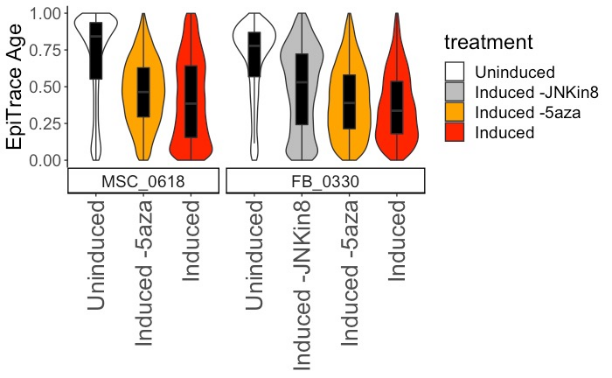
Step 4. Plotting the result to track age changes during early CiPSC induction
Now we can plot the result, simply do some annotation first. We made an excel file with a sheet “meta” to copy the information from GSE188461 Sample file on NCBI:
epitrace_obj_age_estimated_meta$Sample <- gsub('#.+','',epitrace_obj_age_estimated_meta$cell)
openxlsx::read.xlsx('GSE188461metaSheet.xlsx',sheet='meta') -> meta_SRA # please compile this from NCBI.
meta_SRA$treatment <- factor(meta_SRA$treatment,levels=c('Uninduced','Induced -JNKin8','Induced -5aza','Induced'))
meta_SRA$cell_line <- factor(meta_SRA$cell_line,levels=c('MSC_0618','FB_0330'))
meta_SRA <- arrange(meta_SRA,cell_line,treatment)
epitrace_obj_age_estimated_meta$Sample <-  factor(epitrace_obj_age_estimated_meta$Sample,levels=meta_SRA$Sample)
epitrace_obj_age_estimated_meta %>% as.data.frame -> meta_ArchR
left_join(meta_ArchR,meta_SRA,by='Sample') -> meta_ArchR_2
epitrace_obj_age_estimated_meta$cell_line <- meta_ArchR_2$cell_line
epitrace_obj_age_estimated_meta$treatment <- meta_ArchR_2$treatment
comparelist <- list(c('Uninduced','Induced -JNKin8'),c('Uninduced','Induced -5aza'),c('Induced','Induced -JNKin8'),c('Induced','Induced -5aza'),c('Uninduced','Induced'))
ggplot(epitrace_obj_age_estimated_meta,aes(x=treatment,y=EpiTraceAge_iterative)) + geom_violin(scale='width',aes(fill=treatment)) + geom_boxplot(width=0.25,fill='black',outlier.alpha = 0)  + theme_classic()  + theme(axis.text.x = element_text(angle=90,hjust=1,vjust=0.5,size=20),text=element_text(size=18),axis.title.x=element_blank()) + scale_fill_manual(values = rev(c('red','orange','gray','white'))) + ylab('EpiTrace Age') + ggpubr::stat_compare_means(comparisons = comparelist,label = 'p.signif',method = 'wilcox.test')
The results are shown below: